A label printer prints nothing on its own: it needs software that composes the label (text, barcodes, logos), fills it in with the data for each unit and sends it to the printer. The choice of software affects the annual cost, the preparation time and, on thermal printers, the sharpness of the barcodes.
This guide reviews the programs most widely used in industry and logistics —BarTender, ZebraDesigner, NiceLabel and CODESOFT—, a one-off-licence alternative such as Labeljoy, and the free software offered by each brand. We begin with a simple, low-cost option that is valid for any type of label. Prices are those published by each vendor in October 2026; where there is no public price list, we say so.
What label software does
All the programs in this guide handle three tasks, with differing degrees of depth:
- Template design. The exact size of the label, text, images and barcodes (EAN-13, Code 128, QR, GS1 DataMatrix…).
- Variable data. Batches, dates, serial numbers or references that change on every label. Professional programs read them from Excel, a database or an ERP; simple ones take them from the keyboard or a counter.
- Sending to the printer. Through the Windows driver or directly in the printer's own language: ZPL on Zebra, TSPL on TSC, DPL on Honeywell. Direct sending adjusts the barcode bars to the dots of the printhead and allows darkness and speed to be set from the program itself.
The price difference between programs lies mainly in the connection to external data, in automation (printing without intervention from an ERP) and in the number of printers and users each licence allows.
A simple, low-cost option: PrinterTag
PrinterTag is label software that runs as a Chrome and Edge extension, with nothing else to install. It will be available soon in the Chrome Web Store. It works for any label: the data is typed by hand, imported from an Excel file or read from an online shop, and the label comes from a built-in template or from one designed to measure.
- Data: typed by hand; from Excel (.xlsx) or CSV, with one row per label; or read from Shopify, PrestaShop and WooCommerce, from the product page, the product list or the orders.
- Design: template editor with logo, fixed text, date, price, batch, expiry date and sequential numbering, with an exact preview at any size.
- Codes: EAN-13, EAN-8, UPC, Code 128, Code 39, ITF-14, QR, GS1-128 with GTIN, expiry date and batch, GS1 DataMatrix and GS1 Digital Link.
- Printers: thermal printers of any brand (Zebra, TSC, SATO, Toshiba, Brother, DYMO…) and A4 label sheets on laser or inkjet printers. With Zebra printers it prints directly, in ZPL, with control of darkness and speed.
- Price: free up to 50 labels per month; Pro version at 4.99 USD/month or 39 USD/year.
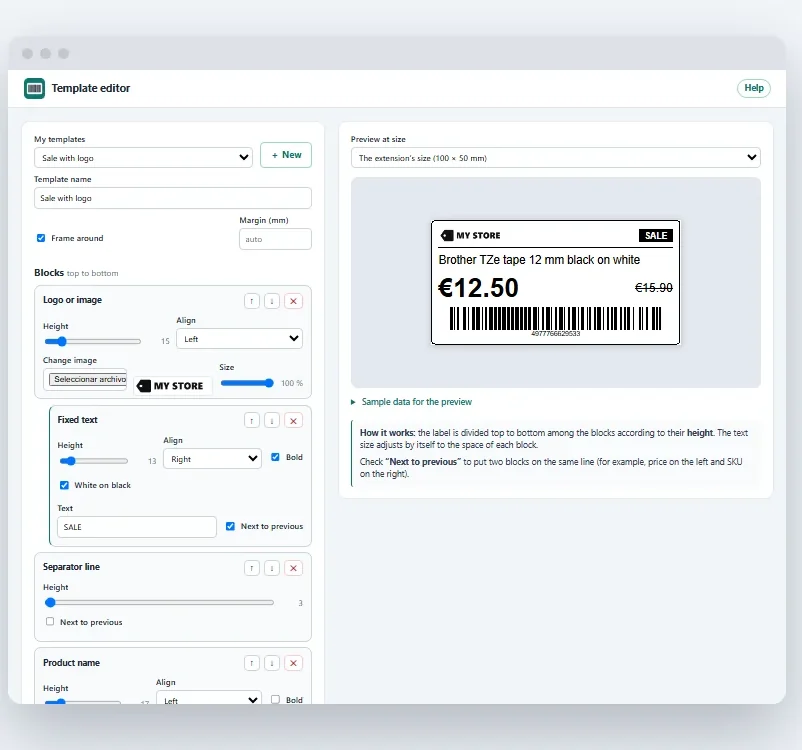
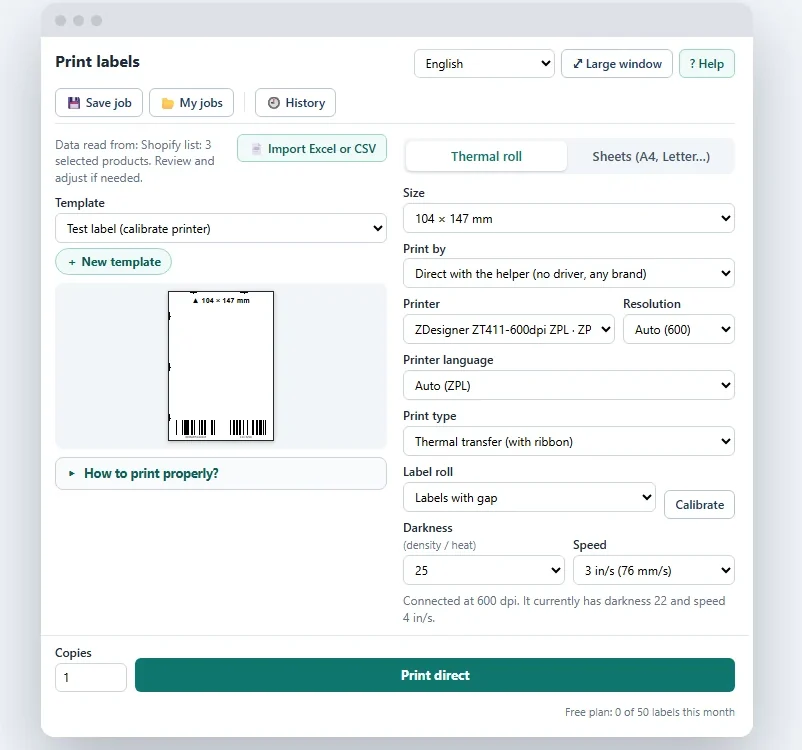
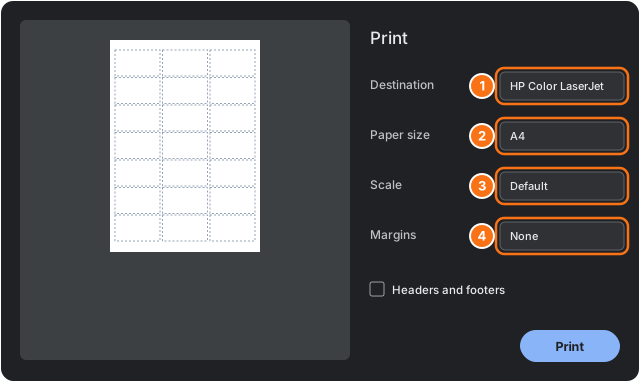
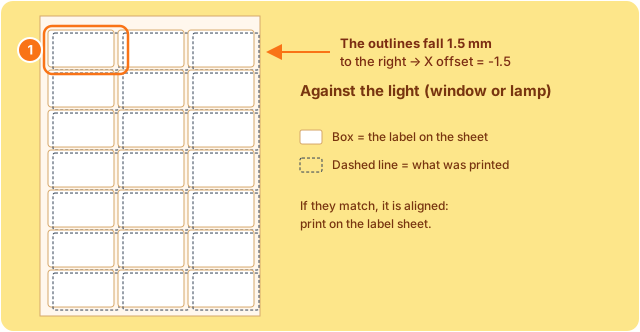
Where it falls short is industrial automation: it does not connect to databases or to an ERP, and it does not encode RFID; for that, BarTender, NiceLabel or CODESOFT are still needed. For everything else (product, price, shipping, inventory or traceability labels with batch and expiry date) it is suitable without setting up a full labelling system. Its website includes a step-by-step visual guide for A4 sheets, Zebra printers and other thermal printers.
Note
Transparency: PrinterTag is developed by a team linked to LIT-OFF.
BarTender
BarTender, from Seagull Scientific, is one of the programs most widely used in industrial and logistics environments. It works with thermal printers of most brands and with office printers, and it is installed on Windows or used in the cloud.
- Editions. Starter (basic design and printing), Professional (databases and variable data), Automation (automatic printing from other systems) and Enterprise.
- Price. Annual subscription only. According to its official pricing page: Starter from 199 USD/year, Professional from 299 USD/year and Automation from 575 USD/year. Enterprise is quoted individually. A 30-day free trial is available.
- BarTender UltraLite. Free version included with some Honeywell and TSC printers. It only prints on printers of the brand that includes it.
It is suitable for companies with several printers, data in an ERP and regulated labels (GS1, chemical, food). For occasional use, the annual subscription per printer or per workstation can prove expensive.
ZebraDesigner
ZebraDesigner is the manufacturer's own software for Zebra printers. It runs on Windows and comes in two editions:
- ZebraDesigner Essentials: free. Label design with data entered from the keyboard, date, time and counters. Compatible with Zebra Link-OS printers.
- ZebraDesigner Professional: one-off licence (Zebra does not publish the price; it is purchased through a distributor). It adds connection to Excel, Access and ODBC databases, RFID encoding and simple scripts. A 30-day trial is available.
Its main limitation is that it only prints on Zebra printers. If a company runs Zebra alongside TSC, Honeywell or SATO, other software will be needed.
NiceLabel (Loftware)
NiceLabel now belongs to Loftware and combines desktop programs (Designer Express, Pro and PowerForms) with cloud platforms for companies with many plants and printers. Its strength is centralised management: approved templates, version control and traceability, useful in regulated sectors.
Loftware does not publish a price list: the price depends on the edition, the number of printers and the distributor. A 30-day free trial is offered.
CODESOFT and LABELVIEW (TEKLYNX)
TEKLYNX develops two programs for Windows: LABELVIEW, mid-range and licensed per user, and CODESOFT, aimed at industrial and multi-user environments. The entry-level edition of CODESOFT limits the number of thermal printers (1 or 3, depending on the licence); the Enterprise edition has no such limit.
As in the previous case, the price is requested from a distributor and a 30-day free trial is available.
Labeljoy
Labeljoy is a program for Windows aimed at SMEs that print labels from Excel or a database, both on A4 sheets and on thermal printers. According to the price list published by the vendor in 2026, it is offered by subscription from 12.90 €/month (billed annually) or with a one-off licence from 329 € (Business edition). It is an option to consider when a subscription is best avoided.
Free software from each brand
Almost all manufacturers of printers and of sheet labels offer free software. It is simple and sufficient for many uses, but each program is limited to its own brand:
- ZebraDesigner Essentials (Zebra) and BarTender UltraLite (some Honeywell and TSC), described above.
- Brother P-touch Editor: for Brother label makers and label printers, on Windows and Mac.
- DYMO Connect: for DYMO LabelWriter printers, on Windows and Mac.
- Avery Design & Print: runs in the browser and is designed for A4 sheets of Avery labels on laser or inkjet printers. It is not suitable for thermal printers.
- gLabels: open-source program for Linux, for label sheets on office printers.
Comparison of programs
| Software | Suitable for | Price | Printers |
|---|---|---|---|
| PrinterTag | Any label, with data typed by hand, from Excel or from an online shop | Free up to 50 labels/month; Pro 4.99 USD/month | Thermal printers of any brand and A4 sheets; Zebra directly |
| BarTender | Industry and logistics, several printers, ERP data | From 199 USD/year (Starter) | Thermal printers of most brands, and office printers |
| ZebraDesigner | Companies with Zebra printers | Essentials free; Professional, one-off payment | Zebra only |
| NiceLabel (Loftware) | Medium-sized and large companies, regulated sectors | Quoted individually | Thermal printers of most brands |
| CODESOFT / LABELVIEW | Industry, multi-user environments | Quoted individually | Thermal printers of most brands |
| Labeljoy | SMEs with data in Excel | From 12.90 €/month or 329 € one-off payment | Office and thermal printers |
| Brand software | Simple use with a single brand | Free | Its own brand only |
Prices published by each vendor, consulted in October 2026. They may vary by edition, number of printers and distributor.
Four questions for choosing software
- Where does the label data come from? If it comes from an ERP or a database and printing has to run without intervention, software with automation is needed (BarTender Automation, NiceLabel, CODESOFT). If it is typed in or comes from an Excel file, a basic edition or Labeljoy is enough.
- How many printers, and of which brands? With a single brand, its free software is usually sufficient. With several brands or several workstations, multi-brand software pays off.
- Are there regulatory requirements? GS1 labels, or chemical-product or food labels with approved templates and traceability, point towards professional software.
- Do the labels come from an online shop? If the products and orders are already in Shopify, PrestaShop or WooCommerce, printing from the shop itself avoids duplicating the catalogue in another program.
Do you need roll or A4-sheet labels for your printer? We supply the right material and ribbon for each model.
Ask with no obligationSummary
For industrial production with several printers, ERP data or regulatory requirements, the suitable programs are BarTender, NiceLabel or CODESOFT, with licences ranging from around 200 USD per year to tailor-made projects.
If all the printers are of the same brand and the labels are simple, the manufacturer's free software —ZebraDesigner Essentials, BarTender UltraLite, P-touch Editor or DYMO Connect— is usually sufficient. Labeljoy serves SMEs that work with Excel and prefer a one-off payment.
For product, price, shipping or traceability labels without an industrial system behind them, a browser extension such as PrinterTag covers the design and the printing, with the data typed by hand, imported from Excel or read from the online shop.
Frequently asked questions
Which software is used to print labels on a thermal printer?
It depends on the brand and the use. For industrial work with several printers and databases: BarTender, NiceLabel (Loftware) or CODESOFT. With a Zebra printer and simple labels: ZebraDesigner Essentials, which is free. Without an industrial system behind it, a browser extension such as PrinterTag can design and print any label, with the data typed by hand, imported from Excel or read from an online shop.
Is there any free software for printing labels?
Yes: ZebraDesigner Essentials for Zebra printers, BarTender UltraLite with some Honeywell and TSC printers, P-touch Editor for Brother, DYMO Connect for DYMO and Avery Design & Print for A4 sheets. All of them are limited to their own brand or to basic functions.
How much does BarTender cost?
BarTender is sold by annual subscription. According to the official pricing page, consulted in October 2026, the Starter edition starts at 199 USD per year, Professional at 299 USD and Automation at 575 USD. Enterprise is quoted individually.
Can labels be printed without installing any software?
Yes. Avery Design & Print runs in the browser for A4 sheets, and PrinterTag is a Chrome and Edge extension that designs and prints labels on thermal printers or on A4 sheets, with the data typed by hand, imported from Excel or read from Shopify, PrestaShop and WooCommerce.
Does the label software affect print quality?
Yes, above all on thermal printers. Software that sends the job in the printer's own language (ZPL on Zebra, TSPL on TSC) adjusts the barcode bars to the resolution of the printhead and allows darkness and speed to be set. With the generic Windows driver, barcodes may come out less sharp.