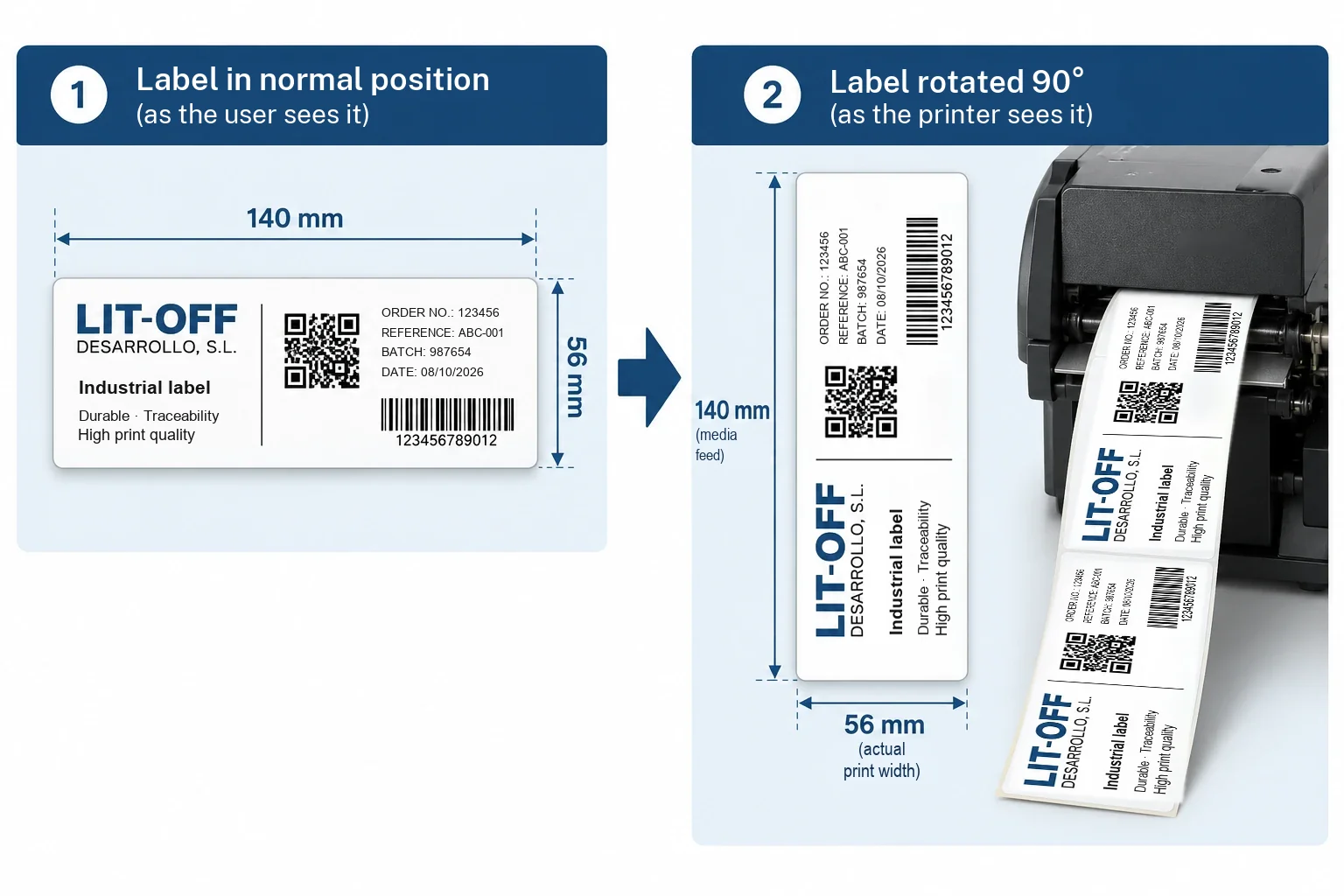
This is a question we get often. The customer needs a 140 × 56 mm label, or a 150 × 70 mm one, and their printer is a 4-inch model, the most common in warehouses and production lines. At first sight, the label does not fit. In most cases it does: you just rotate it 90°.
The limit is the printhead, not the label
A thermal printer only prints where there is a printhead. The printhead is a line of dots that heat up to transfer the ink from the ribbon or to darken the thermal paper, and whatever does not pass under that line is not printed. On 4-inch printers, the usable printhead width is about 104 mm; depending on the model and resolution it reaches 105.7 or 108 mm. That is why “105 mm” is quoted as a round figure.
The printer's data sheet gives two widths that are easy to confuse: the maximum print width, which is that of the printhead, and the maximum media width, somewhat larger, from 112 to 118 mm on most models. A 110 mm label goes into the printer, but only the millimetres that pass under the printhead are printed.
The solution: rotate the design 90°
The example label is 140 mm long and 56 mm high. Unrotated, its 140 mm do not fit under a 104 mm printhead. Rotated 90°, it enters by its 56 mm side, and the 140 mm become the length in the direction of the media feed, which on a label printer is not a limit.
The printer knows nothing about the rotation: for it, this is a label 56 mm wide and 140 mm long. The rotation is done in the design software. You create the label with the size it will have in the machine, 56 wide by 140 long, and rotate the content 90°, or you select landscape orientation in the printer driver. The usual design programs, such as BarTender, NiceLabel or ZebraDesigner, allow this without any trouble.
The rule: the shorter side of the label has to fit within the print width. A 150 × 100 mm label is printed rotated on a 4-inch printer; a 148 × 210 mm (A5) one does not fit in any orientation.
If the label is not designed yet, it is worth bearing this in mind from the start: with the rotation planned in, the format is chosen around the printer you already have, and there is no need to change machines.
What changes when you rotate it
Rotating the label solves the width problem, but it changes four things you need to keep in mind before starting production.
The barcode is now printed as a ladder
A linear barcode can come out of the printer with the bars running in the direction of the feed, like a fence (picket fence), or across it, like the rungs of a ladder (ladder). When you rotate the label, a code that used to print as a picket fence is now printed as a ladder. In ladder orientation, each bar is formed from many consecutive lines of dots and heat builds up in the printhead: at high speed, the edges of the bars can spread and the code loses quality.
✓ What to do
Lower the print speed a little, adjust the print darkness and check the reading with the reader used on the shop floor, or with a verifier if the code has to meet a quality grade. If the design allows, you can also rotate just the barcode within the label so that it still prints as a picket fence.
Fewer labels per roll and per minute
Each label now takes up 140 mm of feed instead of 56. With the same roll diameter, fewer than half as many labels fit, and at the same print speed, measured in millimetres per second, fewer than half as many come out per minute. On short runs you hardly notice; on a line that prints thousands of labels a day, you do.
The ribbon can be narrower
The ribbon has to cover the label with a small margin, so one of about 60 or 64 mm is enough instead of a 110 mm one. In return, each label uses more metres of ribbon, although, as the ribbon is narrower, the area consumed is similar. What changes is that each ribbon roll yields fewer labels and has to be changed more often.
Orientation on the roll
If the labels are applied by hand, it is enough for the design to be rotated correctly. If they are applied with an automatic applicator or a print-and-apply machine, what matters is which edge of the label comes out first: the top of the design, the bottom or a side. When ordering the roll, you need to state the exit position so that the content ends up upright on the part or the box.
When a wider printer pays off
Rotating the label solves most cases, but not all. A 6-inch or 8-inch printer makes sense when:
- Both sides of the label exceed the print width. A5 pallet labels, 148 × 210 mm, markings for drums and containers, or large-format product labels.
- Volume is high. If rotating cuts the labels per minute too much or multiplies roll changes, a wider machine prints the label unrotated and faster.
- The barcode has to come out as a picket fence at high speed. Because of reading or verification requirements, when lowering the speed is not an option.
6-inch printers print 160 to 168 mm wide, depending on the model, and 8-inch ones, 213 to 219.5 mm. These are the models from the most common manufacturers:
| Manufacturer | 4-inch (reference) | 6-inch | 8-inch |
|---|---|---|---|
| Zebra | ZT411, ZD421 | ZT421 and ZT620: 168 mm; ZE521 (print engine): 168 mm | No model on sale (the 220Xi4 was withdrawn from sale in February 2026) |
| TSC | MH241T, T8204 | MH261T / MH361T and T8206 / T8306: 168 mm | T8208 / T8308: 216 mm; TTP‑286MT / 384MT: 216 to 219.5 mm |
| Honeywell | PM45, PX45 | PM65 and PX65: 167.4 mm | — |
| SATO | CL4NX Plus | CL6NX Plus: 167.5 mm | — |
| CAB | SQUIX 4.3, MACH 4S | SQUIX 6.3: 168 mm (203 dpi) or 162.6 mm (300 dpi) | SQUIX 8.3: 216 mm |
| Citizen | CL‑S700II | CL‑S6621: 168 mm | — |
| Toshiba | B‑EX4T3 | B‑EX6T3: 160 mm | B‑852: 216.8 mm; B‑SX8T: 213.3 mm |
Maximum print width according to each manufacturer's data sheet, consulted in October 2026. On some models the width changes with the resolution. Ranges change: confirm the model before deciding. The linked models are available in our shop, ribbonsimpresoras.com. We supply labels and ribbon for any of them.
Does your label not fit your printer? Tell us the dimensions and the printer model.
Ask with no obligationWhat to tell us when ordering the labels
With this information we prepare the label in the format and orientation your printer needs:
- Label dimensions as they read, width by height, and whether it will be printed rotated.
- Printer model and resolution: 203, 300 or 600 dpi. The resolution determines the exact print width.
- Core diameter and maximum roll diameter that the printer accepts.
- How it is applied: by hand or with an applicator, and in that case, the exit position.
- Where the label goes and what it has to withstand, to choose the material and the ribbon. If you are unsure, the guide to choosing the material will help you decide.
Summary
A 4-inch printer prints about 104 mm wide, and whatever does not pass under the printhead is not printed. When the label is wider, the simplest solution is to rotate the design 90° so that it enters by its short side: this works whenever that side fits within the print width.
When rotating, watch the barcode, which is now printed as a ladder and calls for a lower speed, and bear in mind that fewer labels fit on a roll and that the ribbon can be narrower. If the label is applied with an applicator, the exit position of the roll is stated when ordering it.
When both sides exceed the print width, or the volume is high, a 6-inch or 8-inch printer pays off. In either case, we supply the labels and the ribbon in the size and orientation your printer needs.
Frequently asked questions
What width does a 4-inch label printer print?
About 104 mm. Depending on the model and resolution, the usable printhead width runs from 104 to 108 mm: at 203 dpi it is usually 104 mm, and at 300 dpi, 105.7 or 108 mm. The maximum media width it accepts is somewhat larger, but only what passes under the printhead gets printed.
Can you print a label wider than the printer?
Yes, if its shorter side fits within the print width. The design is rotated 90° so that the label enters by that side and the long dimension runs in the direction of the media feed. A 140 × 56 mm label is printed this way on a 4-inch printer. If both sides exceed the print width, you need a 6-inch or 8-inch printer.
Does rotating the label affect the barcode?
Yes: a code that used to print with the bars running in the direction of the feed (picket fence) now prints with the bars across it (ladder). In ladder orientation, at high speed, the edges of the bars can spread. It is advisable to lower the speed a little, adjust the print darkness and check the reading with the barcode reader used on the shop floor or with a verifier.
Which printers print 6-inch or 8-inch labels?
In 6-inch, about 160 to 168 mm of print width: Zebra ZT421 and ZT620, TSC MH261T/MH361T and T8206/T8306, Honeywell PM65 and PX65, SATO CL6NX Plus, CAB SQUIX 6.3, Citizen CL-S6621 and Toshiba B-EX6T3. In 8-inch, about 213 to 220 mm: TSC T8208/T8308 and TTP-286MT/384MT, CAB SQUIX 8.3 and Toshiba B-852 and B-SX8T.
Do I need a different ribbon if I rotate the label?
It can be narrower: the ribbon has to cover the label with a small margin, so for a rotated 56 mm label one of about 60 or 64 mm is enough. The ribbon type, wax, wax-resin or resin, is chosen exactly as usual, according to the material and what the print has to withstand.